Ecommerce Experience Design

A website refresh that rebuilt the US Shopify site as an education-first ecommerce experience, pairing premium Japanese products with the recipes, guides, and real voices American home cooks needed to understand, trust, and use them. It became a study in how education and community, built into the shopping experience itself rather than placed alongside it, can turn interest into sales.
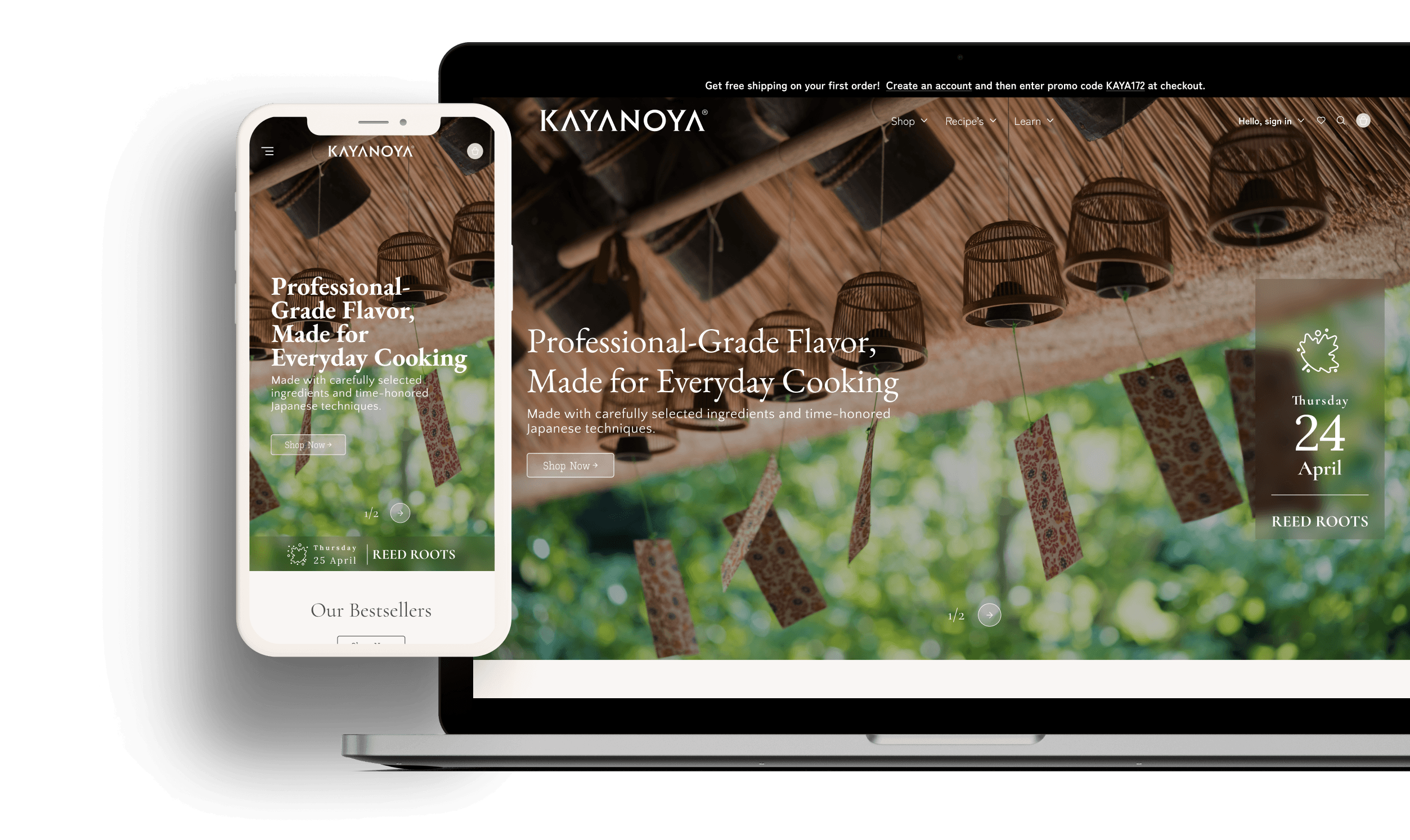


Kayanoya background
Kayanoya is a premium Japanese food brand from Kubara Honke, a family-run maker rooted in a Meiji-era soy sauce brewery founded in 1893. It grew from a restaurant focused on seasonal ingredients and traditional food preparation into a brand that now offers a full range of seasonings, and that heritage still runs through everything it makes today.
Its range spans the Japanese pantry: dashi, soy sauce, seasonings, soups, noodles, drinks, and gift sets, with Kayanoya Dashi, the kelp-and-bonito stock at the umami base of Japanese cooking, as the signature product.
Kayanoya sits at the premium end. It is crafted by artisans using traditional brewing and drying techniques, with carefully sourced ingredients like bonito, kelp, and shiitake, and it offers light-in-sodium options, which is what justifies the price over a supermarket alternative.
At a glance
Going beyond e-commerce
The challenge
Kayanoya asked me to audit their site and work out how to bring their Japanese products into the American market. Up to that point there were plenty of curious new visitors, but they left uncommitted, without converting into sales. The gap was not a lack of interest in the products. I set out to find where the conversion was breaking down, and the research pointed to confidence: people did not understand the products well enough to buy.
The solution
I focused on building trust, turning the redesign of Kayanoya's website into more than a place to shop. It became a space where visitors could explore, learn, and feel confident enough to decide, which is how education turned into conversion.

I developed a three-layer content model in which each layer carries the next: commerce is the heart of the site, education makes the Japanese speciality category understandable, and community keeps people coming back, with Japanese culture guiding each of them. The result was a flow where learning, trust, and purchase all happen together.
Design discovery
Research
- Premium, editorial sensibility
- Heritage with US accessibility
- Education as the conversion engine
- Customisable seasonal content
- Trust through endorsement & transparency
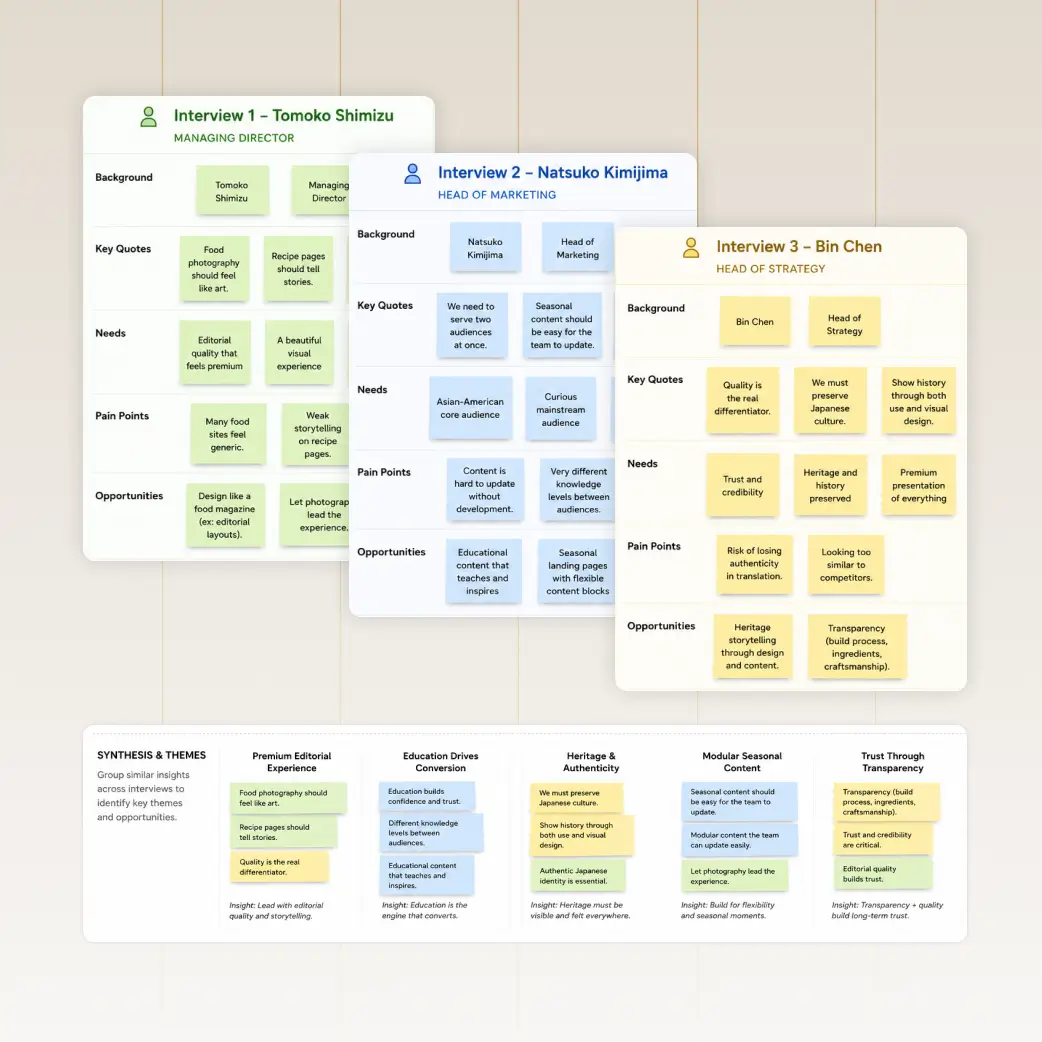
Stakeholder Interviews
I sat down with Kayanoya's American team: Tomoko Shimizu, Natsuko Kimijima, and Bin Chen. They saw quality as the differentiator, and wanted Kayanoya's long Japanese culture and history preserved in both the use and the visual layout. There was also a need to have visual updates on seasonal elements themselves, like seasonal recipes and micro seasons. Grouping their needs and pain points, five themes kept surfacing that shaped the strategic direction.

Brand and Content Audit
The audit confirmed where the architecture was breaking down.
- Content was not connected. 115 pages, no education layer, and recipes never linked to the products they used.
- Trust signals were weak. Kayanoya showed no star ratings on Google Shopping while competitor Ajinomoto Hondashi showed nearly five, and with 73% of online shoppers consulting reviews before buying, none of Kayanoya's existing reviews were reaching those placements.
- Operations split the experience. Three inventory systems ran in parallel with no unified expiration tracking, and four Google Merchant Center accounts fragmented paid-search visibility.
- There was no on-ramp for a first-time buyer. Chef endorsements were unorganised, there was no pathway for seasonal product discovery, and nothing introduced the category to someone meeting dashi for the first time.
Behavioural Analytics
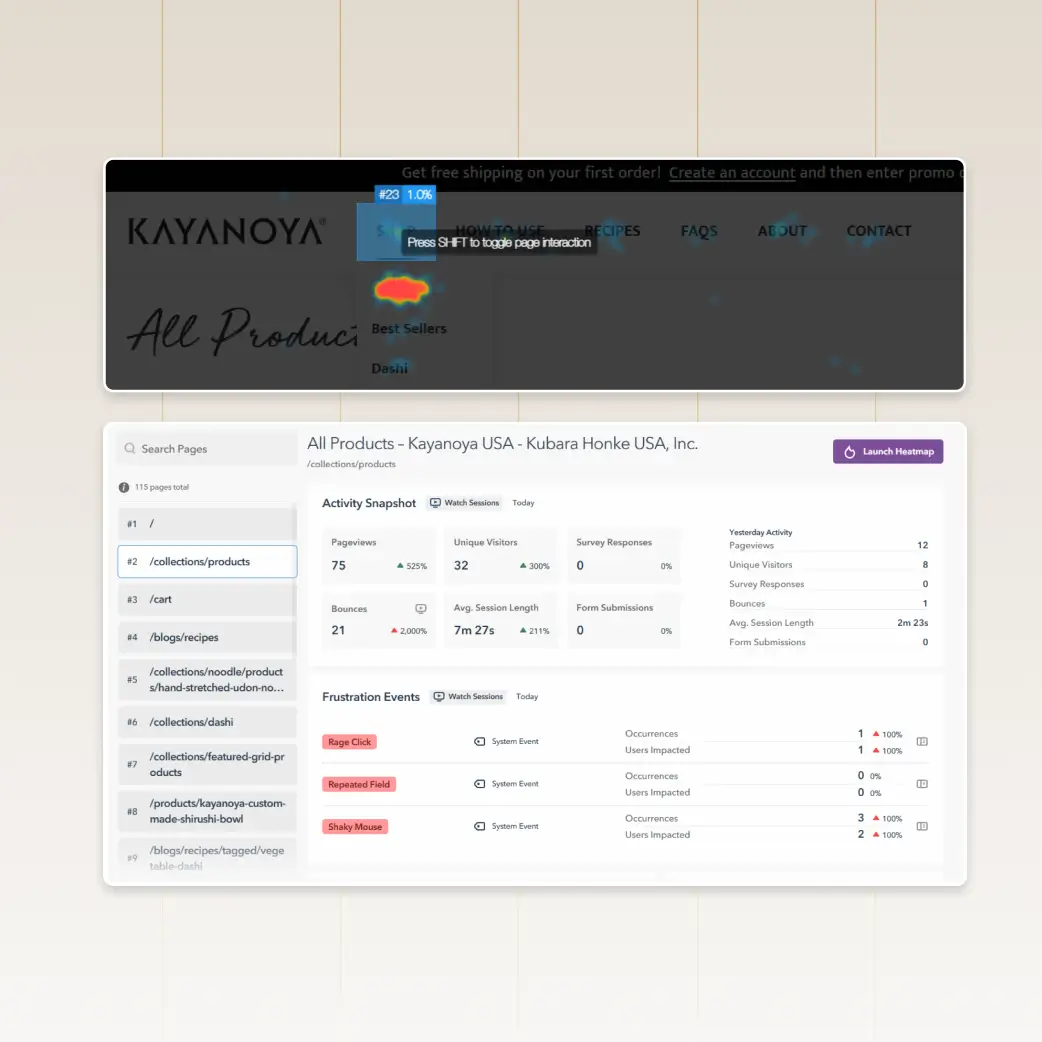
I analysed how visitors actually behaved with GA4 and Lucky Orange, and the story was consistent: attention was never the problem. Sessions ran long, an average of 7:27 minutes, but add-to-cart sat at 3.9% while cart-to-order held at 41.6%. The challenge was conversion into the cart, not at checkout. Bounce rate on the products page peaked at a 2,000% increase during the audit period, and the heatmaps gave me the clue I needed. Shop and How to Use were the two most-clicked items, a signal that buying and learning mattered equally to visitors. But the learning lived apart from the products, which sent users back and forth between the two. It was blocking conversion.
The Audience
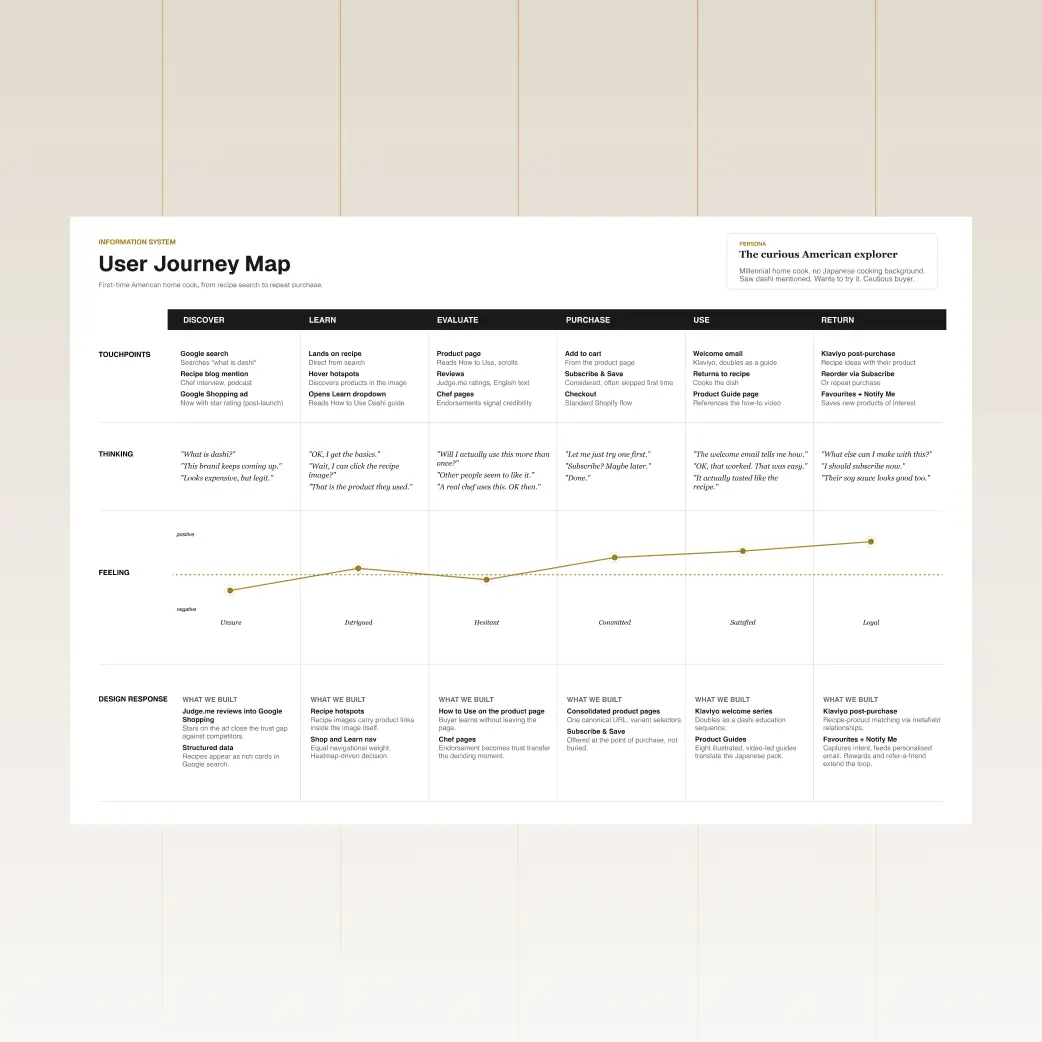
Research showed that the redesign landed on the umami trend. It has become one of the defining tastes shaping how Americans cook, as global cuisines grow more accessible and social platforms make restaurant-style cooking feel achievable at home. It is increasingly used to add savoury depth while cutting sodium, made from high-quality ingredients, which is exactly what Kayanoya offers. Dashi is how umami is made from scratch, so a once-niche category now has a cultural tailwind. That trend shaped two audiences I had to serve at once: the curious American explorer and the Japanese-fluent regular. The first needed education, the second needed incentive to return. The site had to serve both in the same flow.
Built system
Solutions
The site had to sell, teach, and build a community, and because the research showed people were trying to do all three in the same visit, I designed them to overlap rather than sit in separate parts of the site. Japanese culture runs through all of them, carried in the interface and in the people who cook with the products.
The purchase flow it had to serve
01Understanding.
Introduce dashi and the wider Kayanoya range to an audience meeting the category for the first time.
02Trust.
Help buyers decide by building trust through community voices, quality, chefs, and openness about how the food is made.
03Purchase.
Close the distance between discovery, education, and add to cart.
Section 1 of 3
Commerce
Commerce is the business.
Using Jacob’s law to make products easy to find and buy, deliberately familiar: 70% convention, so the 30% of magic has room to land.
The site carries more content than any first-time visitor could absorb in one sitting, and a returning customer should not have to dig through it to reach the shop. So across all of it I leaned on progressive disclosure, revealing information as someone explores rather than presenting it all at once, with navigation depth capped, filters at the top on mobile, and secondary navigation letting the longer About and Product Guide pages unfold in sections.
Shopping made easy.
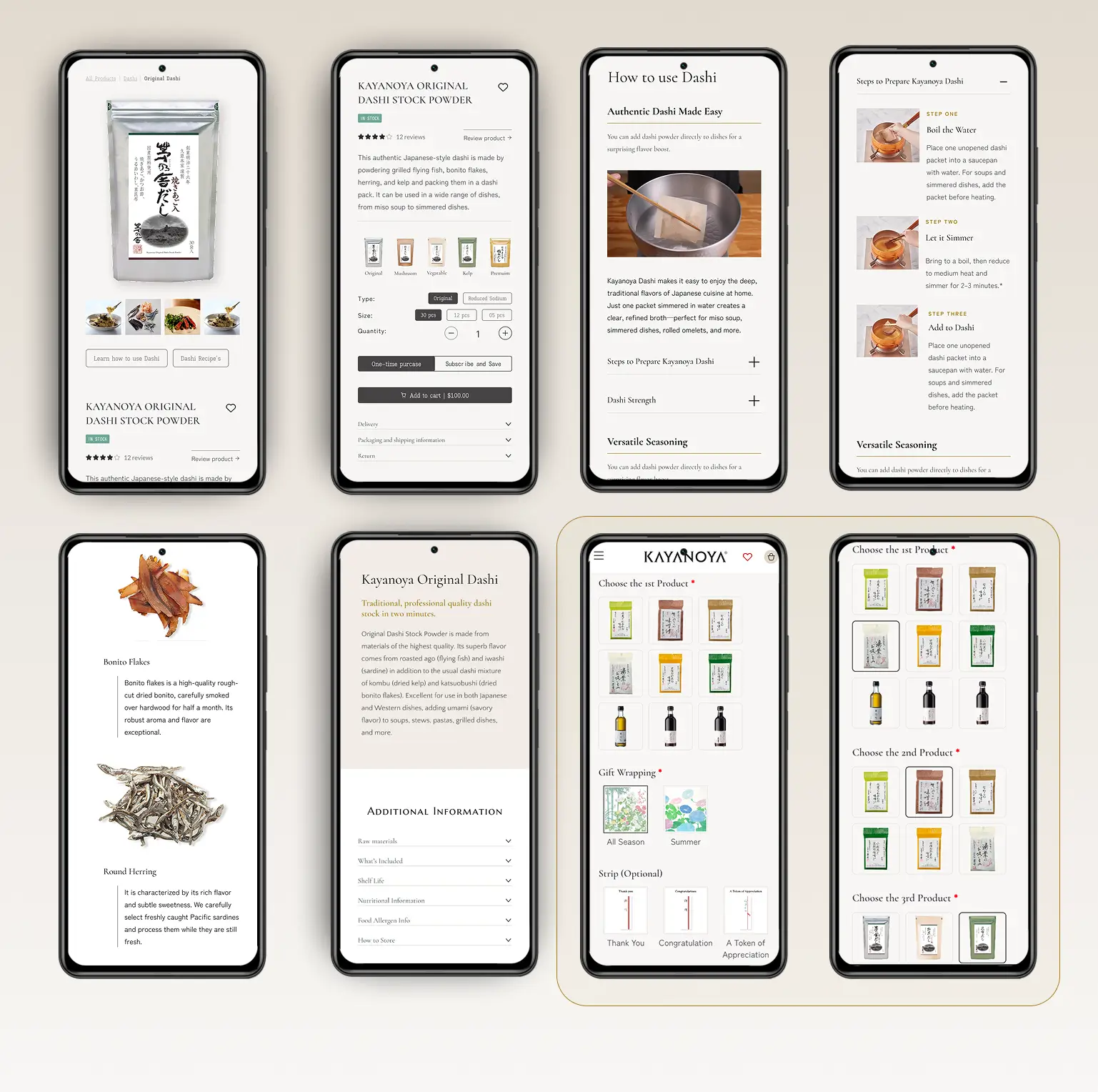
On the product page, every size and variation used to live on its own listing. Sizes, types, and sodium options now sit together on a single page as variants.
Filtering a wide range.
Filters let people search by what they want if they do not know what it is called, whether that is category and size, or finding a recipe by season, cuisine, or the Kayanoya product already in the cupboard.
Search across everything.
One search covers products, recipes, and articles, because a first-time buyer is as likely to look for a dish as for a product.


Section 2 of 3
Education
Education helps conversion.
Users learn the Japanese pantry, what dashi is, and how to use it.
Education needed to happen where decisions were being made, so I built it into the surfaces a shopper was already using.
Mega menus that teach.
Every top-level link opens a menu that merchandises and teaches at once. Alongside the links, each carries curated content and a feature panel the client controls: Shop surfaces the guides that explain a category, Recipes a themed group of dishes, Stories the people behind the food, and About the heritage and process behind the quality.
Product cards that explain themselves.
Hovering a card turns it over to show what the product is, how it is used, the size options, and both a buy action and a way to read more, so someone learns inside the grid without clicking away.

Product Guides on the product page.
Each product embeds its own illustrated, video-led guide, putting usage guidance where the decision is happening rather than somewhere the buyer has to go and find it.
Hotspots on recipe images.
On the homepage, hovering a recipe image reveals the Kayanoya product used in the dish, and clicking takes you straight to it.

Section 3 of 3
Community
Community is what keeps people coming back.
Trust for a premium product does not come from the brand talking about itself, so the site was built to let other people do the convincing.
Real cooks, shared tables, and openness about how the food is made turn a buyer into part of a cooking community, and it is where Japanese culture is lived rather than explained.
Kayanoya People’s Voice.
An ongoing series of real customers and home cooks using the products, so a hesitant first-time buyer sees people like themselves in a kitchen.
Chef Index and chef pages.
Chefs get their own destination with bios and the recipes they signed off.


Reviews and star ratings.
Reviews sit at the point of decision and feed into Google Shopping, closing the gap against a competitor showing nearly five stars while Kayanoya showed none.
Our Process and Sustainability.
The sourcing and production story, so the premium is explained by craft rather than asserted by price.
Reasons to come back.
Events bring people together around the food, while refer a friend, rewards, and Subscribe & Save give them a reason to return and bring someone with them.
Measurable impact
Results
The main goal was to convert curious visitors into buyers, and also to create loyal customers who return to learn and explore. Add-to-cart and cart-to-order figures cover January to April 2026, and session volume compares the 2025 full year against the prior baseline.
Buyers grew confident in the product, with the rate climbing from 3.9% to 5.7%. Moving education into the buying flow gave first-time Kayanoya buyers the confidence to commit instead of leaving.
More qualified traffic reaching the site, after four Google Merchant Center accounts were consolidated into one and recovered the paid-search visibility that had been splitting across duplicate feeds.
Fewer drop-offs at the final step, with more people moving from cart to completed order. Consolidated product pages, visible reviews, and Google Shopping star ratings gave buyers the reassurance they needed to follow through.
“The question I kept returning to on this project is the one I would ask again: does this help someone understand, trust, or use dashi?”